
Your balance, as it stands now.
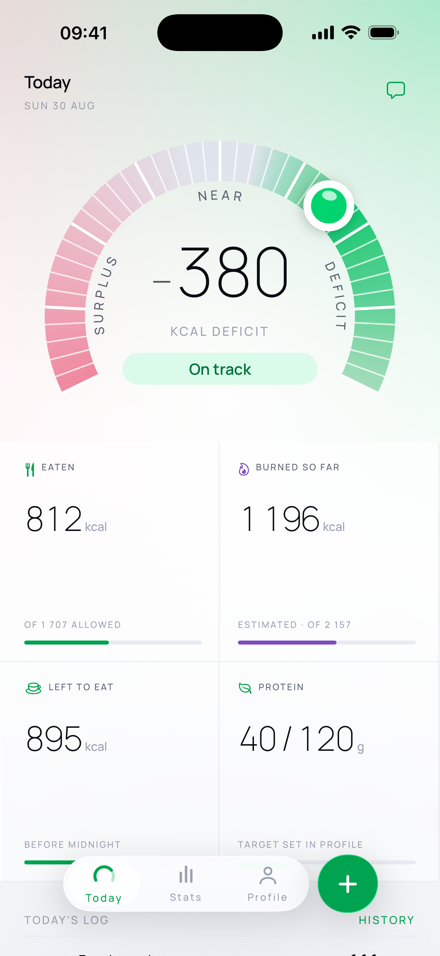
Burnline does one subtraction and shows both sides of it. No daily score, no food prediction, and no mystery number hidden behind a ring.
balance = burned so far − eaten so far
One reading, built in five visible steps.
Each step answers a different question. Keeping them separate is what makes the final number inspectable.
-
Set the direction and the range
Your profile establishes whether the goal is to lose, maintain or gain weight. That places a target range on the scale; it does not turn the largest possible deficit into the best result.
-
Let expenditure accrue
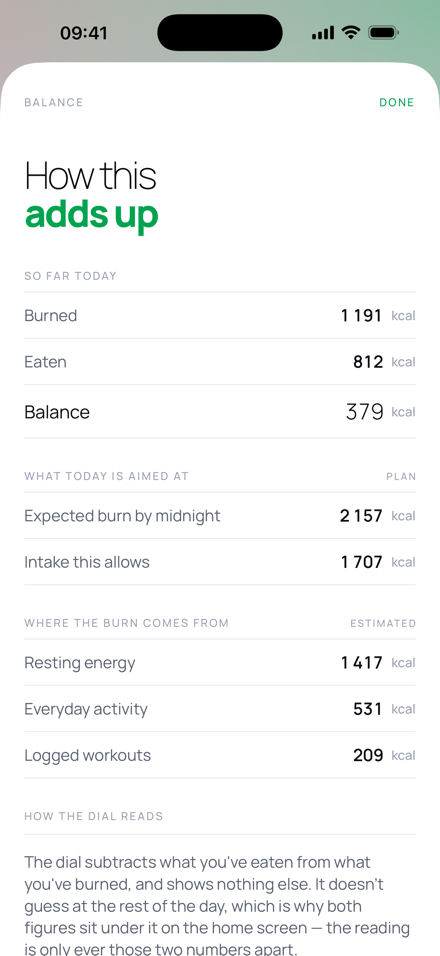
Resting energy accumulates throughout the day, including while you sleep. With permission, Burnline also reads steps, active energy and workouts from Apple Health. You can log movement yourself as well.
-
Record what was eaten
Pick a portion from the built-in list, repeat one of your own entries, scan a barcode, enter the figures by hand, or ask for an estimate. Nothing is counted until it has been recorded and, where needed, confirmed.
-
Subtract the two figures
The result is the calorie balance right now: burned so far minus eaten so far. Tap it and the app shows the arithmetic underneath, including where the burn came from.
-
Read a position, not a score
The dial names the zone and the distance from your range. Colour weakens on both sides of the target, so pushing farther into a deficit cannot look like levelling up.
The label stays attached to the number.
A value you typed, a USDA portion, a Health record and an AI estimate are not the same kind of evidence. Burnline keeps that distinction on every entry instead of flattening them into identical rows.
Read more about the underlying data in Where calorie counts actually come from.
The calendar turns. The calculation continues.
Burnline opens a new local calendar day at midnight because a log needs a clear filing rule. Your energy use does not reset with it, and a missed entry can be added to the previous day from Stats.
The morning stays incomplete
Burn can accrue with time. Food cannot be inferred from an empty log, so Burnline does not project what you may eat later.
Midnight files the entry
A 1 a.m. snack belongs to the new date, while the multi-day history preserves both sides of midnight.
See what is included.
Manual logging, the dial, history, widgets and export remain available without an account. AI features are the paid part because they cost something to run.