

Search “banana” in three calorie apps and you get three different numbers. None of them is lying, exactly. Here is what sits underneath the figure, and which part of it you should actually distrust.
- A food database supplies reference values, not a direct measurement of your meal.
- Energy is usually calculated from macronutrients and published per 100 grams.
- Choosing the wrong portion can matter much more than the final digit in the database.
FoodData Central contains several kinds of evidence
USDA FoodData Central is one public source of food-composition data. Its datasets have different purposes; apps may combine these with manufacturer labels, their own data or user submissions.
| Dataset | What it contains |
|---|---|
| Foundation Foods | Basic foods with analytical results and information about samples and variability. |
| FNDDS | Nutrients and portion weights for foods reported in US dietary surveys. |
| Branded Foods | Food-label information supplied by manufacturers. |
| SR Legacy | Historical reference values from analyses, calculations and published literature. |
| Experimental Foods | Food data from research supported by or conducted with USDA. |
Two apps can therefore show different figures because they selected different foods, brands, preparations or portions. Check the description before assuming that one number is wrong.
The number was probably calculated, not measured
A calorie figure in a food database is often calculated from nutrient amounts and energy factors. For example, USDA’s Foundation Foods documentation distinguishes energy calculated with general Atwater factors from energy calculated with food-specific factors.
That value is useful for estimating food intake. It is not a measurement of the energy your individual body obtained from a particular meal. Even a carefully chosen database entry leaves uncertainty about the food, preparation and amount you ate.
Figures are published per 100 grams. You did not eat 100 grams
A per-100-g value gives you a common basis for calculation. A portion adds the missing quantity. Foundation Foods documentation describes the conversion as the nutrient value per 100 g multiplied by the portion’s gram weight, divided by 100.
Consider an illustrative pizza with 270 kcal per 100 g. These rounded numbers explain the calculation; they are not measurements of a particular pizza or a quoted USDA record.
| Food weight | Calculation | Estimated energy |
|---|---|---|
| 80 g | 270 × 80 ÷ 100 | 216 kcal |
| 120 g | 270 × 120 ÷ 100 | 324 kcal |
| 200 g | 270 × 200 ÷ 100 | 540 kcal |
The food’s calorie density has not changed. The amount on the plate has. A household portion in a database is a reference amount, not a measurement of your own slice.
State matters too: match raw or cooked weights to the corresponding entry. For a mixed dish, calculate a homemade recipe from its ingredients and finished yield before dividing it into portions.
Where apps quietly make it worse
Three habits turn a defensible figure into an indefensible one.
1. Baking the portion into the name
A list with one number per food has to smuggle the portion into the label: a row called “pizza slice”, because “pizza” could not be priced. Now the ambiguity is inside a string nobody can edit. The honest shape is a food, a portion, and a count — where multiplying a published portion weight by the number you say is arithmetic on your own answer, not a new guess.
2. Taking whichever portion happens to be listed first
Databases order portions by their own internal conventions, not by plausibility. Take the first one blindly and you get defaults like one almond, or a single stick of celery. If somebody ate a handful but accepts a one-almond default, the diary under-counts that portion. The default must make its quantity clear.
3. Shipping the whole database
FNDDS holds several thousand foods. Import all of them and searching “chicken” returns a wall of rows reading “Chicken, broilers or fryers, breast, meat only, cooked, roasted” and forty near-identical siblings. Completeness feels like rigour and reads as noise; the user picks whichever row is nearest the top, which is a worse answer than a short curated list would have given them.
What we do about it
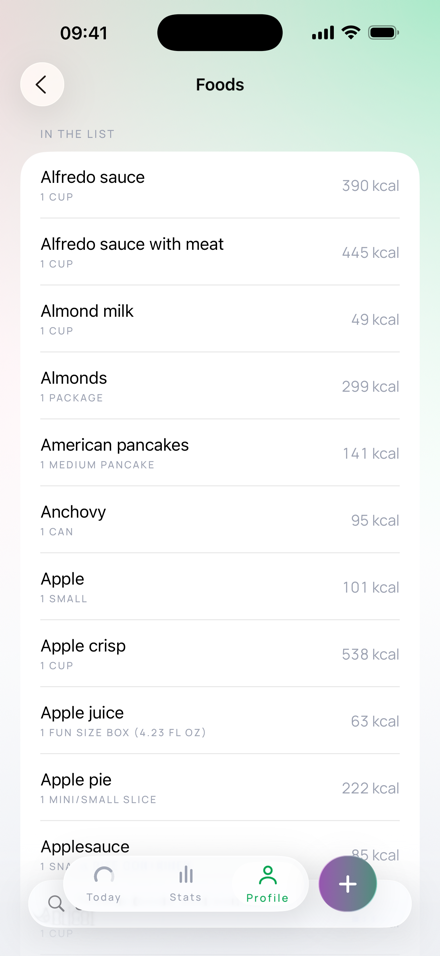
Burnline ships 590 foods. Every one is generated from FNDDS rather than typed by hand, and each row keeps the FoodData Central identifier it came from, so any figure in the app can be walked back to the published record behind it.
A few consequences of taking that seriously:
- Portions are on the row, and editable. The form reads portion, then how many, then calories — because the quantity is the part only you know.
- A revised source is an error, not a silent update. The curation file pins both the identifier and the description it was curated against. If USDA changes a row, the import fails loudly rather than quietly moving a number under a name somebody already trusted.
- Foods that cannot be honestly portioned do not ship. Several were dropped for exactly this — a calzone offered as a whole 424 g one or nothing, pine nuts offered as a single nut or a whole cup. A row that cannot say what it is priced for cannot be trusted.
- The list is deliberately short. A test fails the build if any common word returns more than twelve rows. Curation is a feature, not a shortfall.
What to do with all this
Not despair, and not abandon tracking — the figures are useful, and consistency across days is worth more than precision on any one of them. But calibrate what you are trusting:
- Trust the relative comparisons. Compare matching foods and amounts; “one burrito” and “one banana” each still need a portion size.
- Distrust the last digit. A day’s total quoted to the single calorie is precision theatre.
- Spend your attention on portions. Weighing or checking a labelled portion can resolve a large source of uncertainty.
- Prefer an app that tells you where a number came from. “You typed this”, “this is from the list” and “something estimated this” are three very different claims, and any app that renders them identically is hiding the only information you needed to judge its output.
Check the source behind the number
The pizza calculation is illustrative. Burnline’s food-list count and source identifiers were checked against its bundled food data.

