

A calorie tracker should help you understand a reading, not make a larger deficit look like a higher score. This is a design problem: a filling ring rewards accumulation, while a target band shows where you are relative to the range you chose. Here is why Burnline uses the latter.
- A progress ring implies that more is better and full is the goal.
- A calorie deficit has a target range; either side of it carries different information.
- Words, position and shape must explain the reading without relying on colour.
What a ring says before you read the number
A progress ring suggests that filling the remaining space is the goal. That can be useful for a bounded task, such as completing a checklist. It becomes misleading when the displayed quantity is something a person should not simply keep increasing.
Point it at a calorie deficit and the argument comes along unchanged. The bar fills as you eat less. The app’s most satisfying state — the complete circle, the full bar, the colour change — is the one where you have eaten the least. Which means the interface is quietly congratulating you for something nobody would defend out loud.
A deficit is not a quantity you want to maximise. It has a range that suits you and territory on both sides of it that doesn’t, and one of those sides is not the side people worry about.
A familiar component can carry an unintended message. Rings fit neatly in widgets and are easy to recognise, but their visual reward needs to match what the number actually means.
The alternative: put the goal in the middle
The fix is not a different colour scheme. It is a different kind of scale.
A diverging scale has its peak somewhere in the middle and falls away in both directions. The target is the destination, and distance from it — in either direction — reads as distance from it. Nothing beyond the target can look like more of a good thing, because past the target the scale is already on its way back down.
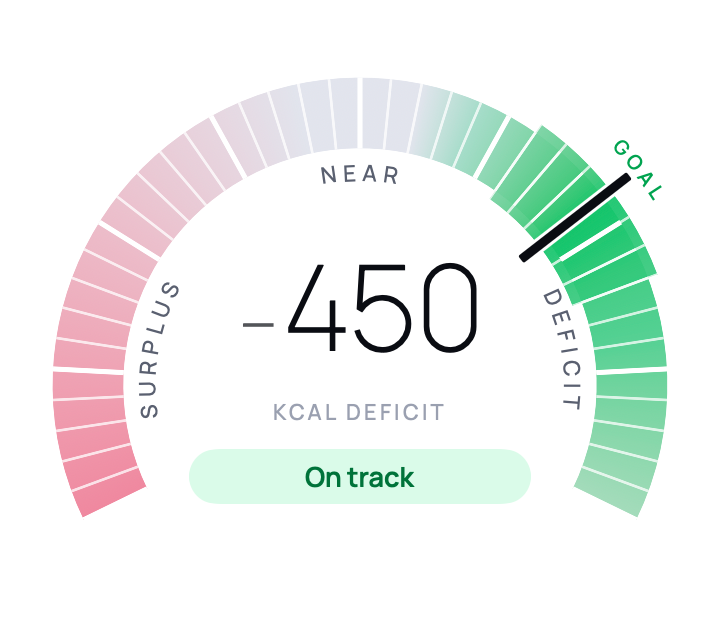
Concretely, in Burnline: a marker rides an arc running surplus, through maintenance, into your target band, and out the far side into larger than you planned. The arc is a graduated scale rather than a fill, so nothing accumulates as you eat less. Drag it and watch what happens at the right-hand end — the app stops getting happier.
Three decisions that fall out of it
The two shoulders share a colour
Just under the target and just over it are painted the same. This is deliberate and it took some arguing. Giving the over-target side its own hue makes it a distinct destination, and a distinct destination on the “more” side of a scale is exactly the thing being avoided. Sharing the colour makes the target the peak of the ramp and everything else a falling-off. Position and wording tell the two shoulders apart; they do not need their own colours to do it.
If your scale has stopped moving, start with the reasons you may be in a calorie deficit but not losing weight before treating a larger deficit as the answer.
Overshooting is not a second goal
The reading must keep reporting distance after the marker passes the chosen range. A larger deficit should not unlock a more satisfying state or a stronger suggestion of success.
The same principle applies on the other side. A surplus describes the relationship between two estimates; it is not a verdict on the person who recorded them.
The status line says how far, not how bad
Under the figure sits a sentence: 110 under your target, On track, 300 over your target. It reports distance and declines to editorialise. The range belongs to the user — they set it, they can change it — and being outside a range you chose is information about today, not a verdict on you.
Near maintenance, the dial stops showing a number at all and just says Near. Forty calories either side of zero is noise, and printing it would claim a precision the underlying figures cannot support.
Colour is never the only thing carrying the message
There is a practical reason this has to be true, beyond it being the right thing to do: the Lock Screen strips colour from accessory widgets entirely. Whatever the design means in green has to survive being rendered in white on black.
So every state carries a text label and a number as well as a colour, the zones are told apart by tick weight and brightness as well as hue, and the marker protrudes past the scale rather than being a dot that could vanish into a band. Read aloud, the dial gives the whole thing in words: the figure, the direction, and where it sits relative to the range you set.
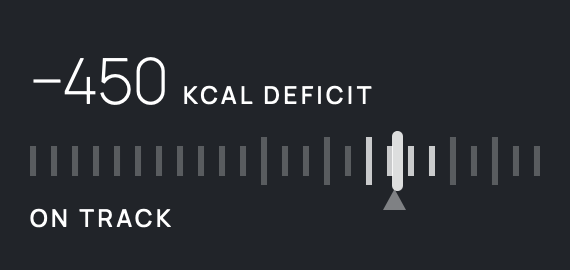
The green itself comes in three cuts, for the same kind of reason. The vivid one is bright enough to find at a glance but fails text contrast on white, so it is reserved for graphics; a deeper cut carries large text, and a deeper one again carries small text. One green cannot do every job, and pretending otherwise is the quickest way to ship something that looks fine to the person who designed it and is unreadable to somebody else.
A logging streak is not a deficit score
Burnline now shows a weekly logging calendar and a count of consecutive days with entries. That count records a habit: it does not depend on meeting a calorie target or making the deficit larger.
This is a change from the original version of the app described in this article. The distinction still matters: a run of diary entries is information about the record, not a score for eating less. A missed day does not turn the earlier entries into failures.
The general version
If you are choosing a control for a number, the question is not which one looks best in the mock-up. It is: what does this shape claim about the quantity, and is that claim true?
- A fill claims more is better and full is the goal.
- A gauge with a marker claims there is a right region and you are somewhere relative to it.
- A streak highlights continuity; its label must say what counts as a day.
- A trend line claims the direction is the point.
Pick the one whose built-in argument you are willing to defend, because your users will absorb it long before they read a word of your copy.

